CATEGORY REFERENCE

omiqq Mobile App for Android and iOS

Our mobile app puts the full omiqq lobby in your pocket — live tables, slot rooms and sportsbook markets, all loading in a single tap. Sign in with...

AndroidiOSAPK 30MBPush alertsFingerprint login
omiqq omiqq Mobile App for Android and iOS
omiqq What our app brings to your phone

What our app brings to your phone

We built the app so the things you do most — opening a slot, checking a live table, dropping a betslip — happen in one or two taps. Fingerprint or face login skips the password screen, push alerts ping you when a sportsbook market moves or a deposit clears, and a quick-deposit shortcut keeps DANA and OVO top-ups under ten seconds. Dark

mode, offline lobby preview and saved favourites make the daily flow feel native.

App features that change how you browse

Biometric login

Sign in with fingerprint or face on supported phones. Your session opens in under two seconds, and there's no password to type when you're switching tabs at a café or on the train.

Push alerts

Toggle notifications for sportsbook market moves, settled bets and deposit confirmations. We keep them quiet by default so you only hear from us when something on your account actually changes.

Dark mode

The app respects your phone's system theme and ships a true-black dark mode for OLED screens, which keeps battery use low during long live-table sessions in the evening.

Offline lobby preview

Recently viewed slots and live tables stay cached so the lobby still renders when your signal drops on the LRT. The moment you reconnect, balances refresh automatically.

Quick-switch tabs

Slots, live casino and sportsbook sit in a bottom tab bar, so jumping from a Sweet Bonanza spin to a Baccarat seat takes one thumb tap with no full reload between them.

Saved favourites

Pin the slots and tables you open most. Your favourites sync across Android, iOS and desktop, so the game you played last night sits at the top when you sign in tomorrow.

omiqq Install in three quick steps

Install in three quick steps

Getting the omiqq app on your phone takes a couple of minutes. Android users grab the APK directly from us — we don't list on third-party stores. iOS users follow the build profile link. Once installed, sign in with your existing account or open one in seconds.

  • Download the APK
  • Allow install from unknown sources
  • Open and sign in

Phone compatibility at a glance

Auto-refresh hourly
omiqq Android version

Android version

92%

Android 8.0 Oreo and above. Tested on Samsung, Xiaomi, OPPO, Vivo and Realme builds common across...

omiqq iOS version

iOS version

97%

iOS 13 and above on iPhone 7 or newer. iPad runs the same build in compatibility...

omiqq RAM

RAM

96%

2GB minimum, 3GB recommended for smooth live-dealer streaming. Slot lobbies run comfortably on entry-level handsets.

omiqq Storage

Storage

95%

Around 30MB for the install, plus 60-80MB of cache once you've browsed your favourite slot rooms...

omiqq Supported regions

Supported regions

94%

Available across Indonesia where local law permits, with Bahasa-aware UI and DANA, OVO, GoPay and QRIS...

RTP percentages are informational reference values from provider documentation. Actual session outcomes vary.

ON THE GO

A quick tour of the app screens

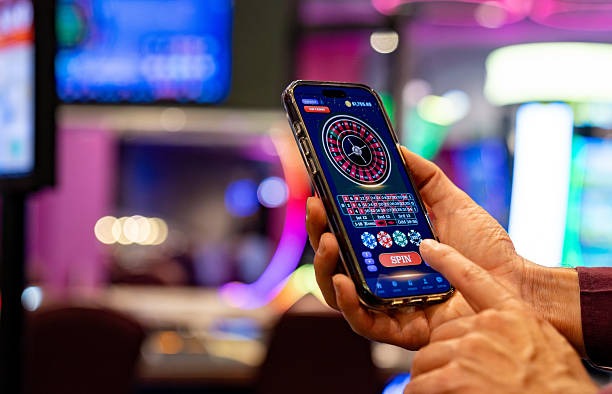
From the moment you open the app, the lobby is the home screen — no splash gates, no popups. The bottom bar carries you to live casino, slots, sportsbook and...

Live lobby preview
Quick bet slip
Account access
Slot favourites
Sportsbook search
Deposit shortcut
omiqq mobile gaming
HELP CHANNELS

Help paths for app users

Team online

In-app support chat

Open the chat bubble from any screen in the app. Our support team replies in Indonesian or English, and chat history stays attached to your account between sessions.

Email support

Email us from the help screen and the app pre-fills your account ID and device info, so we can sort install or login questions without a long back-and-forth.

Install guide

A step-by-step install walkthrough sits inside the help section, with screenshots for Android permissions and the iOS configuration profile flow for first-time installers.

TRUST MARKERS

Why the app is safe to install

Code-signed builds

Every Android APK is signed with our developer key and every iOS build carries a verified profile. The app checks...

No third-party stores

We distribute only from omiqq.app. If you see our app on a mirror site or unofficial store, it's not from...

Account recovery

Lost your phone? Sign in on desktop, revoke the old device from the security panel and reinstall on the new...

Encrypted sessions

All app traffic runs over TLS 1.3 with certificate pinning, so even on shared café Wi-Fi your login and deposit...

Permission minimalism

The app asks only for storage to save the cache and notifications if you opt in. No contacts, no location...

Quiet update channel

Updates download in the background and apply on next launch. Release notes appear in the app so you can see...

PLATFORM COMPARISON

App vs mobile browser experience

01

Login speed

App: fingerprint sign-in in two seconds. Browser: type your email and password each visit, or trust the browser autofill, which sometimes drops on cache clears.

02

Push alerts

App: settled bets and deposit confirmations land on your lock screen. Browser: you only see status updates while the tab is open and active.

03

Lobby loading

App: assets cached locally, slot tiles render instantly. Browser: every visit re-pulls images and game manifests, slowing the first scroll noticeably.

04

Quick deposit

App: DANA, OVO, GoPay and QRIS sit behind a floating button. Browser: deposit lives in a menu that takes two or three taps to surface.

05

Stability

App: live-dealer streams hold up when the app goes to background. Browser: switching tabs often pauses or kills the stream mid-hand.

06

Storage cost

App: 30MB install plus a small cache. Browser: zero install, but every session redownloads assets and burns more mobile data over a week.

Six things our app does well

One-tap lobby

The home screen is the lobby. No splash, no interstitial — open the app and you're already looking at live tables, trending slots and the sportsbook coupon for tonight.

Fingerprint sign-in

After your first login, biometric unlock takes over. It's faster than typing a password and it keeps your session local to your device, not a shared browser profile.

Smart search

Type two letters and the app surfaces matching slots, live tables and sportsbook markets together, so finding Aviator or a Liga 1 fixture takes a second, not a scroll.

Floating deposit

A persistent deposit button keeps DANA, OVO, GoPay and QRIS one tap away from any screen, so topping up never pulls you out of the game you're watching.

Live-table picture-in-picture

On supported Android phones, a baccarat or roulette stream can shrink into a floating window while you check a slot in the main view, so you don't miss the next deal.

Light footprint

The app stays around 30MB after install and trims its cache automatically when storage gets tight, which matters on the entry-level handsets common across Indonesia.

Questions about the omiqq app

Pull the Android APK directly from omiqq.app on this page. iOS users tap the install link to add the configuration profile. We don't publish on third-party stores, so always start from our brand home.

Yes. The Android APK and iOS build are both free, and the install itself doesn't ask for a deposit. You only fund your account when you're ready to play, using DANA, OVO, GoPay or QRIS.

If your phone runs Android 8.0 or newer, or iOS 13 on iPhone 7 and up, you're set. Two gigabytes of RAM is enough for slots, three is smoother for long live-dealer streams.

No. Your existing omiqq account signs in on the app, desktop and mobile browser. Balances, favourites and bet history sync across all three, so switching devices doesn't reset anything.

Yes. The fingerprint or face check happens on your phone's secure enclave, not on our servers. We only receive a token confirming your device approved the unlock, never your biometric data itself.

Sign in on desktop, open the security panel and revoke the lost device. That kills its session immediately. Reinstall on your new phone, sign in once, and your account picks up where you left off.

We push small updates every few weeks for new game releases, sportsbook fixtures and stability fixes. Updates download in the background and apply on next launch, with release notes shown inside the app.